Revenue management
Bus revenue management software: fares, tracking and daily cash-up
Revenue management for bus operators means setting the right fares and keeping control of every rand that comes in. BusBot covers both halves: fare management by route, day and time on one side, and real-time tracking of tickets, luggage, parcels, refunds and expenses with shift cash-up and takings reports on the other.
The BusBot dashboard
What does the revenue dashboard show?
Bookings by channel and station, payments collected and refunded, and trip occupancy by route, with bookings and payments updating live as the day happens. A takings report breaks money down by counter, channel, route and type: fares, luggage and parcels.
See the dashboard live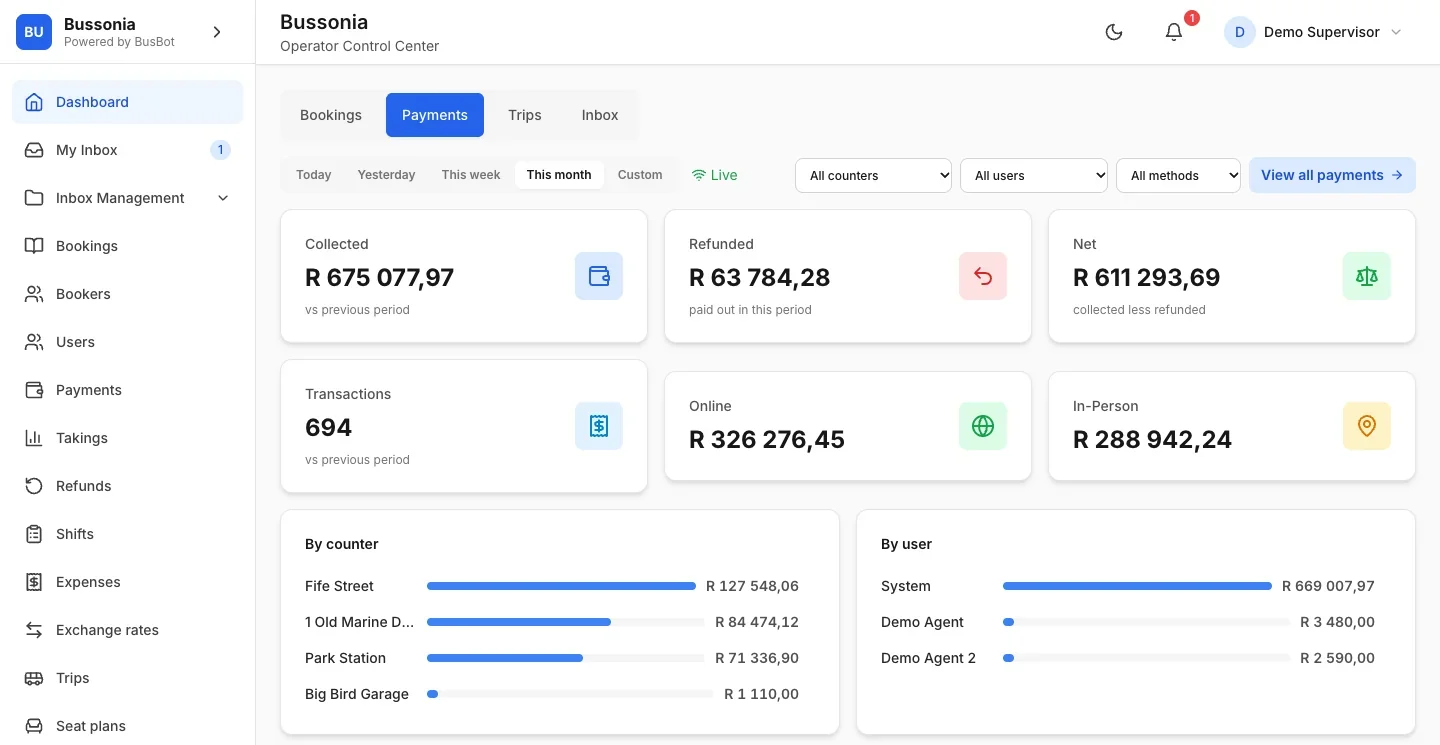
Both halves
What does revenue management cover in BusBot?
Fare management
Set adult, child and infant fares by route, day and departure time, change a whole route and date range in one go, and adjust a single bus when demand moves.
Fare management and dynamic pricingTracking and cash-up
Every ticket, bag and parcel payment tracked by channel, with shift cash-ups, Z reports, banking records and an exceptions report for the things that need a second look.
Every shift
How does shift cash-up work?
-
1
Open the shift
A counter agent opens a shift with a float, and every sale and expense is recorded against it.
-
2
Count and close
At close, the agent enters the cash count and card-machine and wallet totals, and a Z report shows any difference per payment account.
-
3
Review and bank
A supervisor reviews the report and receives the cash, and a banking record follows.
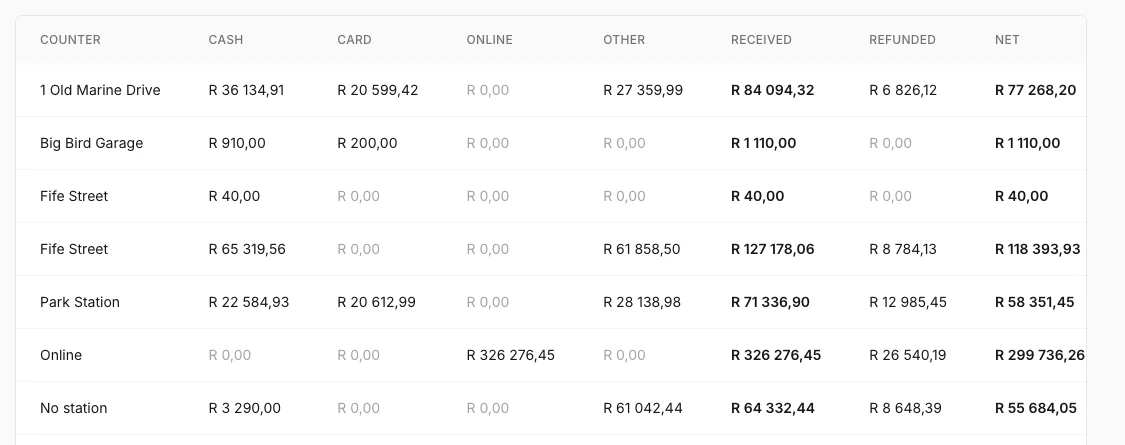
Online payments through PayFast are recorded automatically and settle straight to your own PayFast account, so BusBot never holds your money. The exceptions report flags voids, short shifts, duplicate card references and unpaid bags and parcels. Book a free demo.
Money out
Where do expenses and refunds fit in?
Cash expenses and refunds are recorded against the same shifts, so your takings report shows money in and money out together.
Learn about bus expense management and how luggage and parcel payments become visible revenue.
Questions
Frequently asked
What does revenue management mean in BusBot?
It means setting your fares and keeping control of every rand. You set fares by route, day and time, while ticket sales from WhatsApp, web and the station, luggage and parcel income, refunds and daily expenses sit in one dashboard and are cashed up at the end of every shift.
What does the dashboard track?
Bookings by channel, station and route, payments collected and refunded, and trip occupancy, updated live. A takings report adds luggage and parcel payments and cash expenses.
How does BusBot handle cash-up?
Agents close each shift with a cash count, a Z report shows any difference per payment account, a supervisor reviews it, and a banking record follows.
How do operators get paid for online bookings?
Online payments go through PayFast and settle straight to your own PayFast merchant account, so BusBot does not hold your funds.
Is BusBot finance-ready?
Yes. It provides shift cash-ups, Z reports, banking records, refund approvals and a full audit log, so your finance team can trace every rand.
Does BusBot change fares automatically?
No. You set fares per route, day and time and update them in bulk when demand changes. See fare management and dynamic pricing.
Can we start with just some of it?
Ask us. Tell us which parts you need first, such as ticketing, parcels, expenses or the WhatsApp support inbox, and we will take you through how to start.
Explore BusBot
More ways BusBot helps bus operators
See your whole operation in one place
Book a free demo and we’ll show you how BusBot handles tickets, parcels, expenses, payments and customer support for an operator like yours.