
Guide
How to run a shared WhatsApp inbox for a bus company
To run a shared WhatsApp inbox for a bus company, give every agent a role, decide how conversations are assigned, agree your labels and saved replies, use internal notes for hand-overs, and resolve each conversation when it is done. Then review waiting times each week so you can fix slow spots.
Step by step
How do you run a shared WhatsApp inbox?
-
1
Give each person a role
Make agents support agents and team leads supervisors, so agents see their own and unassigned conversations and supervisors see everything.
-
2
Decide how chats are assigned
Let agents claim a chat by replying, or switch on auto-assign to share new chats between online agents, least busy first or in round-robin.
-
3
Agree your labels
Use a short, shared set such as Urgent, VIP, Refund and Callback Requested, so everyone filters the same way.
-
4
Save your common replies
Write saved replies for the questions you answer most, with the passenger’s name filled in automatically. See 8 WhatsApp canned replies.
-
5
Use notes for hand-overs
Leave an internal note with an @mention when you pass a conversation on, so the next person doesn’t have to ask the passenger again.
-
6
Resolve, then review
Mark each conversation resolved when it is done, then review waits and satisfaction on the supervisor dashboard each week.
Why it works
Why does a shared inbox beat one shared phone?
With one phone, nobody knows who is handling a chat, and the answers live in one person’s head. A shared inbox records who owns each conversation and keeps the notes next to it.
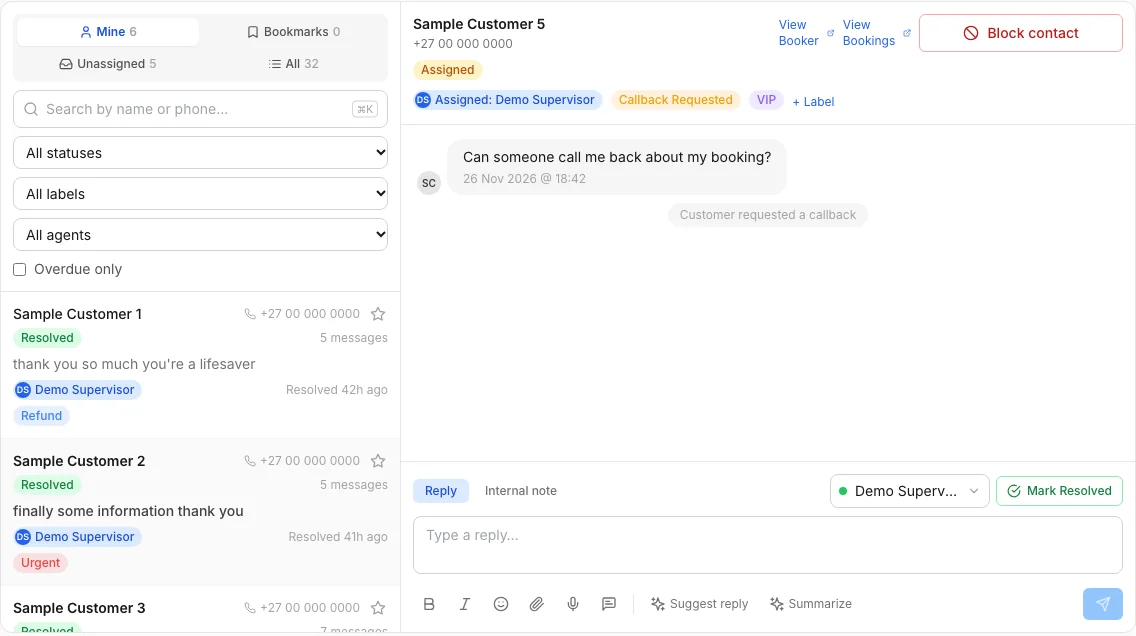
BusBot’s WhatsApp shared inbox does this on one number. Read customer support for bus operators or Book a free demo.
Questions
Frequently asked
What is a shared WhatsApp inbox?
One WhatsApp number that a whole team answers from, with each conversation claimed by or assigned to an agent.
Who should be a supervisor?
Team leads who need to see every conversation, reassign work and review reports. Everyone else can be a support agent, who sees their own and unassigned chats.
Should every conversation be assigned?
Each conversation should have one owner. Let agents claim by replying, or switch on auto-assign to share new chats between online agents.
How do we avoid answering the same passenger twice?
Claim the conversation by replying. If another agent already holds it, BusBot stops the second reply, and a supervisor can reassign it.
How often should we review the inbox?
Weekly is a good start. Look at the longest waits and SLA breaches on the supervisor dashboard, and fix the slow spots.
Explore BusBot
More ways BusBot helps bus operators
See your whole operation in one place
Book a free demo and we’ll show you how BusBot handles tickets, parcels, expenses, payments and customer support for an operator like yours.