Guide
8 WhatsApp canned replies every bus operator should save
Canned replies are saved WhatsApp messages an agent can insert in one click. Bus operators get the most from a small set that covers greetings, delays, times and prices, payment checks, lost luggage, parcels, hand-overs and closing a chat. Here are eight to start with, with placeholders for names and details.
The eight replies
Which canned replies should a bus operator save?
Replace anything in [square brackets] with your own details. In BusBot, {{customer_name}} and {{agent_name}} fill in automatically.
| Situation | Reply |
|---|---|
| Greeting | Hi {{customer_name}}, thanks for contacting [Operator name]. This is {{agent_name}}. How can I help? |
| Delay | Hi {{customer_name}}, your [route] bus is running about [number] minutes late because of [reason]. We will update you here if that changes. |
| Times and prices | Hi {{customer_name}}, the [route] bus leaves [station] at [time] on [date]. The fare is [fare]. Would you like to book? |
| Checking a payment | Thanks {{customer_name}}. Please send me your booking reference and I will check the payment for you. |
| Lost luggage | I am sorry about your bag, {{customer_name}}. Please send your ticket number, the trip and a description of the bag, and I will pass it to [team]. |
| Passing it on | {{customer_name}}, I have passed your request to [team]. They will reply here by [time]. |
| Parcel collection | Your parcel [parcel number] is ready at [station]. Please bring [what the collector must bring] to collect it. |
| Closing the chat | Is there anything else I can help with, {{customer_name}}? If not, I will close this chat. Thank you for travelling with [Operator name]. |
In BusBot
Where do saved replies live in BusBot?
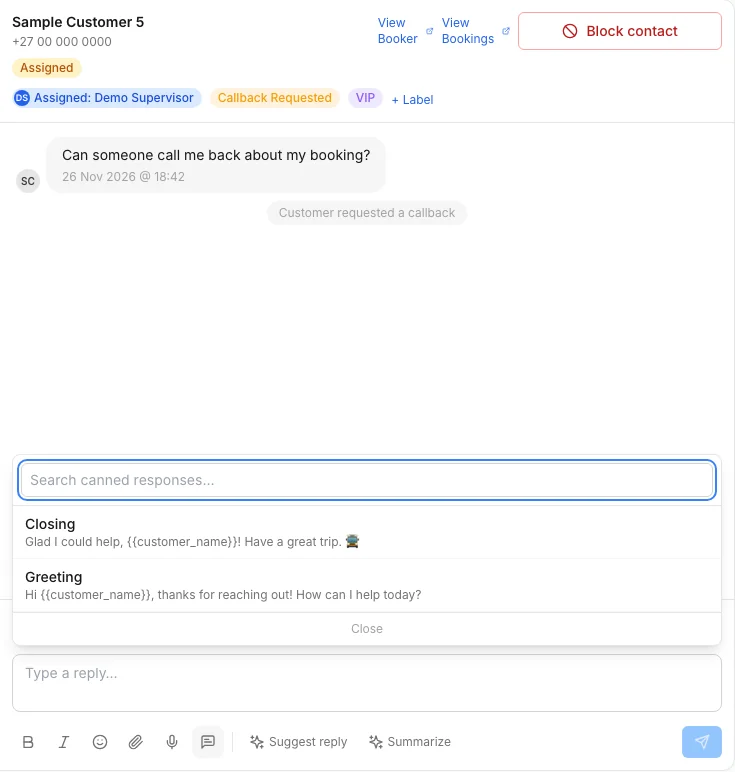
Agents insert a saved reply from the conversation, and the passenger’s and agent’s names fill in. See the WhatsApp shared inbox, how to run one, or Book a free demo.
Questions
Frequently asked
What is a canned reply?
A saved message an agent can insert in one click, usually with placeholders for the customer’s name and other details. BusBot calls them canned responses.
How many canned replies do we need?
Start with the eight here, then add a new one whenever your team types the same answer three times.
Can a canned reply use the passenger’s name?
Yes. In BusBot, {{customer_name}} and {{agent_name}} fill in automatically when the reply is inserted.
Should canned replies state our refund or luggage policy?
Only your own policy, kept current. Write it once in the reply, and don’t copy another operator’s terms.
Where do canned replies live in BusBot?
Under Inbox Management, in Canned Responses, and in a picker inside each conversation.
Explore BusBot
More ways BusBot helps bus operators
See your whole operation in one place
Book a free demo and we’ll show you how BusBot handles tickets, parcels, expenses, payments and customer support for an operator like yours.